
Siemens MS41 · BMW M52 · 1995–1998
Your stock ECU, live-tunable.
MS41 Live is a patched firmware and a browser-based editor for the Siemens MS41. VE-based speed density, wideband closed loop, launch control and flat shift — tuned while the engine runs, over a standard K-line cable. No piggyback, nothing added inside the ECU.
MS41 Live is in private beta — contact us to get access. For off-road and motorsport use.

Interactive demo
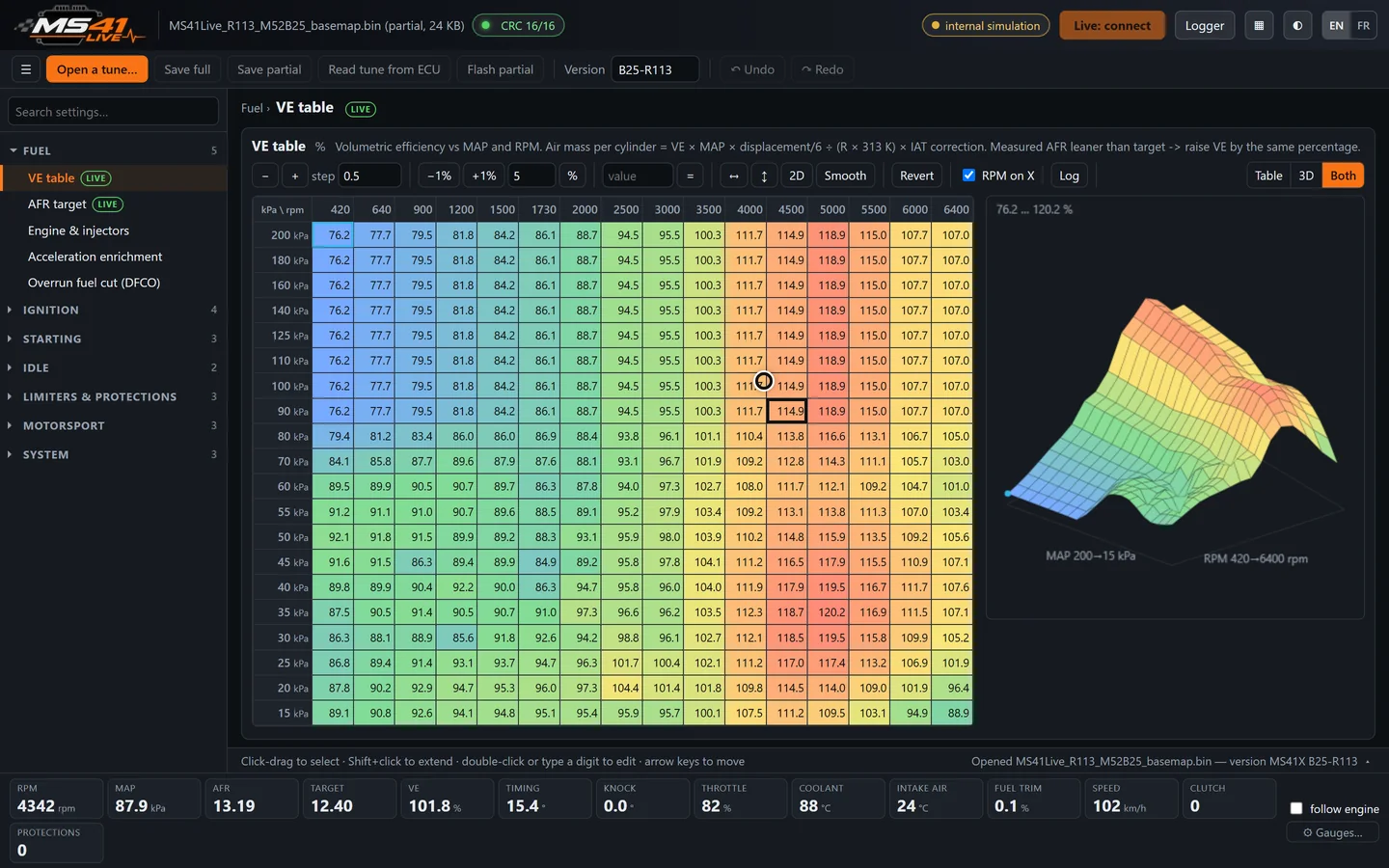
The real editor. A simulated engine.
This is the editor you get, running here against its built-in simulated engine. Edit cells, switch to the 3D view, open the dashboard. Nothing is connected and nothing can be flashed from this page.
How it works
A firmware, an editor, a cable.
The firmware changes how the ECU computes fuel and spark. The editor talks to it through the diagnostic socket you already have.
Flash the firmware — once
The first installation is one full flash with the MS41 flashing tool you already use, on the bench or through the OBD socket. Start from the base tune for your engine. After that, everything is done from the browser.
Wire two 0–5 V sensors
A MAP sensor and a wideband controller take over the two inputs the stock oxygen sensors used (ECU pins 76 and 75). 5 V and sensor ground come from the throttle-position-sensor feed. An optional clutch switch can use the MAF signal pin.
Plug in and tune live
Open the editor — one HTML file that works offline — in Chrome or Edge, connect a standard K+DCAN / INPA cable and edit the tables while the engine runs. Then flash the calibration from the same window in about 25 seconds.
Features
What the MS41 can do with it.
Everything below exists today and is in the demo. What has and has not been driven on a car is listed under Status.
VE-based fuelling, like a modern standalone
A 16 × 20 VE table on MAP × RPM, manifold pressure, displacement and intake-air temperature give the air mass per cylinder. The AFR target table turns it into fuel. Injector flow, dead time, fuel density and stoichiometric ratio are plain settings, not hidden in a map.
- Needs a 0–5 V MAP sensor (3 bar typical); the tables run to 200 kPa
- No MAF sensor needed: load comes from the MAP sensor, and every stock BMW table (warm-up, transients, idle, knock, VANOS) is indexed by MAP too
- Table view, 3D view or both; select, scale, interpolate, smooth, undo

Wideband closed loop on your AFR targets
A 0–5 V wideband controller replaces the stock sensors. The stock BMW lambda control then regulates to the AFR target table everywhere it is active — you set the target per cell and the ECU trims fuel to reach it.
- AFR target table 16 × 20 on MAP × RPM, displayed as AFR or as lambda
- Presets for AEM X-Series, Innovate, 14Point7 Spartan and PLX outputs — or enter your own AFR = a × V + b
- Stock narrowband sensors (one or two) are still possible, but not recommended: they only regulate to lambda 1

Edit while the engine runs
VE, AFR target and ignition tables, plus the launch, flat-shift and limiter settings, are edited with the engine running. Changes go straight to ECU RAM; a cursor shows the cell the engine is in.
- Gauges at about 6 samples per second, and a full-screen dashboard
- “Follow engine” moves the selection with the operating point
- RAM edits are lost when the ECU powers down — the editor then flashes them to keep them

Flash from the browser in about 25 seconds
The editor writes the 24 KB calibration through the same cable. Only the calibration is rewritten; checksums are corrected automatically.
- The link is tested at flashing speed before anything is erased
- Every block is confirmed by the ECU, then the whole calibration is read back
- Resume after a cable drop, and guided key-off / key-on at the end
- Read the tune back from the ECU at any time

Ignition on MAP × RPM, knock control kept
The base ignition table is 16 × 20 on MAP × RPM. The stock BMW corrections are applied on top, and knock control stays active with the stock BMW strategy.
- Idle timing, VANOS correction and knock settings on their own pages
- Cranking, warm-up, idle and overrun fuel-cut tables are there too

Launch control, flat shift, protections
Launch control holds an RPM limit with a fixed ignition angle. Flat shift works from a clutch switch — or without one, by detecting the shift from the RPM rise rate.
- Hard-cut rev limiter, adjustable live
- Lean-AFR protection and boost cut
- Launch, flat-shift and limiter settings adjustable with the engine running


Three analog inputs, assigned in the editor
MAP sensor, wideband and clutch switch can each use the Lambda 1 pin (75), the Lambda 2 pin (76) or the MAF signal pin (8). 0–5 V only.
- MAP presets: Bosch 3 bar, AEM 3.5 bar, GM 3 bar
- Wideband presets: AEM X-Series, Innovate, Spartan, PLX
- The editor warns when two functions are set to the same pin

Base tunes
Starting points for M52B20, M52B25 and M52B28 on gasoline with stock injectors.
One offline file
The editor is a single HTML file. Nothing to install, and it works without a connection.
Stock strategies kept
Cold start, warm-up, idle, VANOS and knock control stay on the stock BMW strategies, with their tables in the editor.
English & French
The whole interface switches language in place, with your file open.
Screenshots are taken from the demo build: real editor, simulated engine values.
VE + MAP + wideband, explained
From “how much air” to “how long to open the injector”.
A MAF-based ECU measures the air. A speed-density ECU computes it: at a given RPM and manifold pressure, the engine fills its cylinders to a known fraction of their volume — the volumetric efficiency, VE. Get the VE table right and the ECU knows the air mass of every cylinder filling from pressure, temperature and RPM alone. (313 K is the 40 °C reference of the calculation; the IAT correction table adjusts for the actual intake temperature.)
The fuel follows from the AFR target you ask for in that cell. Because air and target are separate, you tune the engine’s breathing once in the VE table, and decide the mixture in the AFR table.
air = VE × MAP × (displacement ÷ 6) ÷ (R × 313 K) × IAT correction
fuel = air × 14.7 ÷ (AFR target × stoich)
pulse width = fuel ÷ injector flow + dead time
The wideband closes the loop. Where closed loop is active, the lambda control trims the fuel until the measured AFR sits on the target. The trim it needs tells you how far the VE table is off:
VE correction = measured AFR × (1 + trim) ÷ target AFR
Hardware you need
Parts you can buy anywhere.
MS41 Live is software. Sensors and cable are standard items; nothing is specific to this product.
A Siemens MS41
The stock ECU of the BMW M52 with single VANOS, 1995–1998. No modification inside the box.
A K-line diagnostic cable
The common FTDI-based “K+DCAN” / INPA cable, and a laptop with desktop Chrome or Edge (the editor uses Web Serial).
A 0–5 V MAP sensor
3 bar is typical. Presets exist for Bosch 3 bar, AEM 3.5 bar and GM 3 bar; any linear sensor works with its slope and offset.
A wideband controller
Any controller with a 0–5 V analog output. Presets for AEM X-Series, Innovate, 14Point7 Spartan and PLX.
A clutch switch
For launch control and switch-based flat shift. If the switch line carries 12 V, a two-resistor divider brings it into the 0–5 V range.
Your MS41 flashing tool
The firmware goes in with one full flash, bench or OBD, using an existing MS41 flashing tool. Keep it at hand as a fallback.
Supported engines
Base tunes for the three M52 displacements.
Each base tune is a starting point on gasoline with the stock injectors: VE mode, MAP on the Lambda 2 pin, wideband on the Lambda 1 pin. Expect to trim it with the wideband.
| Engine | Typical cars | Displacement | Stock injectors (≈ flow at 3.5 bar) | Base tune status |
|---|---|---|---|---|
| M52B20 | E36 320i · E39 520i | 1991 cc | Bosch 0 280 150 415 · ≈ 184 cc/min | Beta scaled from the B25, not yet run on an engine |
| M52B25 | E36 323i · E39 523i | 2494 cc | Bosch 0 280 150 415 · ≈ 184 cc/min | Beta derived from the development tune (E85, 660 cc injectors), not yet run on gasoline |
| M52B28 | E36 328i · E39 528i · Z3 2.8 | 2793 cc | Bosch 0 280 150 440 · ≈ 231 cc/min | Beta scaled from the B25, not yet run on an engine |
Injector figures come from parts listings and are meant to be trimmed with the wideband. Gasoline base tunes use a stoichiometric ratio of 14.7; set 14.1 for E10. More in Base tunes.
Status — what’s tested
Built on one car, driven every day. Beta everywhere else.
You should know exactly what has run on an engine and what has not.
Used on the development car
E39 523i, M52B25, manual gearbox, naturally aspirated, E85 with 660 cc injectors. Driven daily on MS41 Live.
- VE mode (speed density) for fuel and ignition
- Wideband closed loop on the AFR target table
- Live tuning with the engine running
- Flashing the calibration from the browser
- Launch control and flat shift
- Cold starts, warm-up and idle on the stock strategies
Not validated on a car yet Beta
These exist in the firmware and the editor, but have not been proven on an engine.
- Boost: the tables go to 200 kPa, the turbo is not fitted yet
- The M52B20 and M52B28 base tunes, and the gasoline / stock-injector B25 base tune
- Re-mapping the analog inputs to other pins
- Stock-narrowband modes (possible, not recommended)
- Automatic gearboxes
- US-market MS41.1 ECUs
Good to know. The first installation needs one full flash with an existing MS41 flashing tool (bench or OBD); after that everything is done from the browser. MS41 Live is for off-road and motorsport use.
Pricing
Private beta.
Get MS41 Live.
MS41 Live is in private beta — contact us to get access.
MS41 Live is available.
The price will be announced at launch. Beta testers get it at a discount.
- The MS41 Live firmware
- The browser editor: live tuning, dashboard, flashing
- Base tunes for M52B20, M52B25 and M52B28
- The documentation on this site
Tell us about the car.
Model, engine, gearbox, sensors — the e-mail is prefilled, you only fill in the blanks.
or write to contact@ms41-live.com
Which cars and ECUs does it work on?
The Siemens MS41 of the BMW M52 with single VANOS, 1995–1998: E36 320i / 323i / 328i, E39 520i / 523i / 528i, Z3. It was developed on a European-market ECU with a manual gearbox. US-market MS41.1 ECUs and automatic gearboxes have not been validated yet. The later M52TU (double VANOS) uses a different ECU and is not supported.
Do I have to open or modify the ECU?
No. MS41 Live is firmware. The MAP sensor, the wideband and the optional clutch switch connect to pins that already exist on the ECU connector. There is no piggyback and no extra board.
Do I still need the MAF sensor?
No. MS41 Live runs on a MAP sensor and a wideband: load comes from the MAP sensor. The MAF can stay plugged in or be removed; the old MAF modes are no longer supported.
Can I keep the stock oxygen sensors?
Yes, but it is not recommended. With stock narrowband sensors (one or two) the closed loop only regulates to lambda 1, the AFR target table is only used to compute fuelling, and there is no lean-AFR protection. These modes have not been validated on a car. The recommended setup is a wideband controller on the Lambda 1 input. Remember that the MAP sensor needs an analog input too: the editor warns when two functions are set to the same pin.
Is boost supported?
The VE, AFR target and ignition tables run to 200 kPa absolute and there is a boost cut and a lean-AFR protection. But boost has not been validated on a car yet: the development engine is naturally aspirated and its turbo is not fitted. Treat everything above atmospheric pressure in the base tunes as untested.
Which browser and computer do I need?
Desktop Chrome or Edge, because the editor talks to the cable through Web Serial. Firefox and Safari do not provide it, and phones cannot connect to the ECU. The editor itself is a single HTML file that works offline.
What happens to my live changes when I switch off?
Live edits are written to ECU RAM. They are lost when the ECU powers down, so the editor flashes them to keep them. If the editor and the ECU hold different values when you reconnect, it asks which side to keep.
What if a flash from the browser is interrupted?
Keep the ignition on and press Resume: the missing blocks are written and everything is read back. If that is not possible, switch the ignition off for 10 seconds and flash again. Nothing is erased before the link has been tested, and only the calibration area is written from the browser. Keep your flashing tool as a fallback. The full procedure is in Flashing.
Does knock control still work?
Yes. Knock control stays active with the stock BMW strategy; its limits are adjustable in the editor.
Which fuels and injectors?
The base tunes are for gasoline with stock injectors (stoichiometric ratio 14.7; set 14.1 for E10). The development car runs E85 on 660 cc injectors. Injector flow, dead time, fuel density and stoichiometric ratio are settings, so other combinations are a matter of entering them and trimming the VE table.
Is it road legal?
MS41 Live is intended for off-road and motorsport use. Modifying engine management can be illegal on public roads; that is your responsibility. See the terms and disclaimer.
How do I get it, and what does it cost?
MS41 Live is in private beta — contact us to get access. The price will be announced at launch. Beta testers get it at a discount.
MS41 Live is available: use the Buy button on this page. Questions: contact@ms41-live.com.